An agent can draft a meeting brief, summarize a call, or assemble a proposal in minutes. Then the next request arrives and it starts from zero: a different structure, a different tone, questions you already answered. The task was completed, but the way you work was not carried over.
That gap separates a demo from a working setup. Training an AI agent here means teaching it a repeatable workflow — the steps, context, tools, and standard for a finished deliverable — so the next similar task starts from your method instead of a blank page.
This guide is for business users, especially presales and solutions engineers, who want an agent to follow an existing workflow without code or fine-tuning.
What Does It Mean to Train an AI Agent?
In machine learning, training usually means adjusting a model's weights with large datasets, which requires engineering work and measurement. That is rarely what a business team needs to get consistent work from an agent.
Here, training means configuring the agent around a job: describing the task, documenting the sequence, supplying background and rules, connecting the systems that hold the facts, and saving the repeatable parts. In this workflow-based approach, you are not changing the model's weights. Instead, you configure the context, tools, instructions, and reusable capabilities around it. What changes is what the agent knows about your work and what it is expected to produce.
Think of onboarding a new teammate: explain the purpose, show an example, name the systems to check, review the first attempt. Agent training follows the same logic, except the method is reused without another onboarding conversation.
| What you provide | What it changes | Example |
|---|---|---|
| A one-off prompt | This conversation only | "Summarize these notes" |
| Memory or stored facts | What the agent knows | Account history, stakeholder names |
| A Skill | How a recurring task is done | Pre-call brief process and standard |
| Connected tools | What the agent can reach | CRM, email, shared drive |
A stored fact fills in a detail; a Skill defines the process and the finished output. For a closer definition, see what makes something an AI Skill.
What You'll Need Before You Start
You do not need a perfect process map, only enough material to describe one real task and judge the result.
- One recurring task you have done at least three times and expect to repeat.
- Two or three finished examples, including one that needed heavy edits, with a note on why.
- Access to the relevant sources: CRM records, email threads, call notes, templates, or exports.
- A written definition of "done": length, sections, audience, and hard exclusions.
- Thirty to sixty minutes to write down what you already know.
How to Train an AI Agent to Follow Your Workflow
The steps follow one example: a pre-call brief for a discovery call. Company and account names are illustrative.
Step 1: Define the Task and Expected Output
Write the request as a brief for a capable colleague new to the account. Name the deliverable, audience, length, required sections, and what to leave out. "Prepare me for the call" leaves the agent to guess at all of it.
Prepare a one-page pre-call brief for Thursday's discovery call with Halden Logistics, for me and the account executive. Include an account snapshot, the business problem in the customer's words, three open questions, technical constraints, and a suggested agenda. Exclude pricing and competitor speculation. Mark missing facts as unconfirmed.
Done when: someone else could grade a draft against your definition.
Step 2: Break the Workflow Into Clear Steps
List the sequence in the order you actually work, not the order that sounds tidy. Each step needs an input, an output, and a check. Where a step depends on judgment, say what informs it.
- Pull the last 14 days of email and the most recent call notes.
- Summarize the business situation in three bullets, using the customer's language.
- Map the problem to product areas; note what fits and what does not.
- Identify constraints: timeline, systems, compliance, and the budget owner.
- Draft three questions the existing material cannot answer.
- Assemble the brief and mark every unverified claim.
Done when: every step has a clear input and output.
Step 3: Provide Relevant Context, Rules, and Examples
Context comes in three layers: account facts, rules for decisions and prohibitions, and examples that show the standard.
Rules must be testable. "Be professional" cannot be checked. "One page, the customer's terminology, a source and date for every number" can.
- Use the customer's wording for the business problem.
- Cite the source and date for every figure.
- If CRM and email conflict, use the more recent source and note the difference.
- Never infer budget size or decision timeline.
- Cut background before cutting open questions.
Attach one strong example and one weak example with margin notes. The weak one shows the failure modes you care about: unsourced claims, or a summary that repeats the vendor's pitch.
Done when: the agent can restate the rules in its own words and apply them to a case you invent. If it cannot, the rule is still too abstract.
Step 4: Connect the Tools and Information Sources the Workflow Requires
An agent without access will ask for files or fill gaps with guesses. Connecting the right systems solves the first problem; a source hierarchy solves the second. Decide which system is authoritative for each fact, and what happens when sources disagree.
- CRM: opportunity stage, contacts, close date.
- Email: the latest customer reply.
- Shared drive: approved solution deck and call notes.
When sources conflict, show both values, use the most recent dated item, and flag the difference.
Grant only the access the workflow needs. For example, a pre-call brief may only require read access to email and CRM, while workflows that involve task updates may require write access. Always follow your organization's permission policies.
Done when: on a real task, the agent can retrieve a fact from each source and say where it came from. A fact it cannot trace should be treated as unverified.
Step 5: Turn Repeatable Instructions Into Reusable Skills
After one good run, separate the stable method from the details that change each time. The stable part includes step order, output standard, rules, and tool usage. The variable part includes the account name, meeting date, attendees, and objective.
Save the stable part as a Skill and keep the variable part as a short request at the start of each task. If you are building one for the first time, how to create AI Skills covers the mechanics.
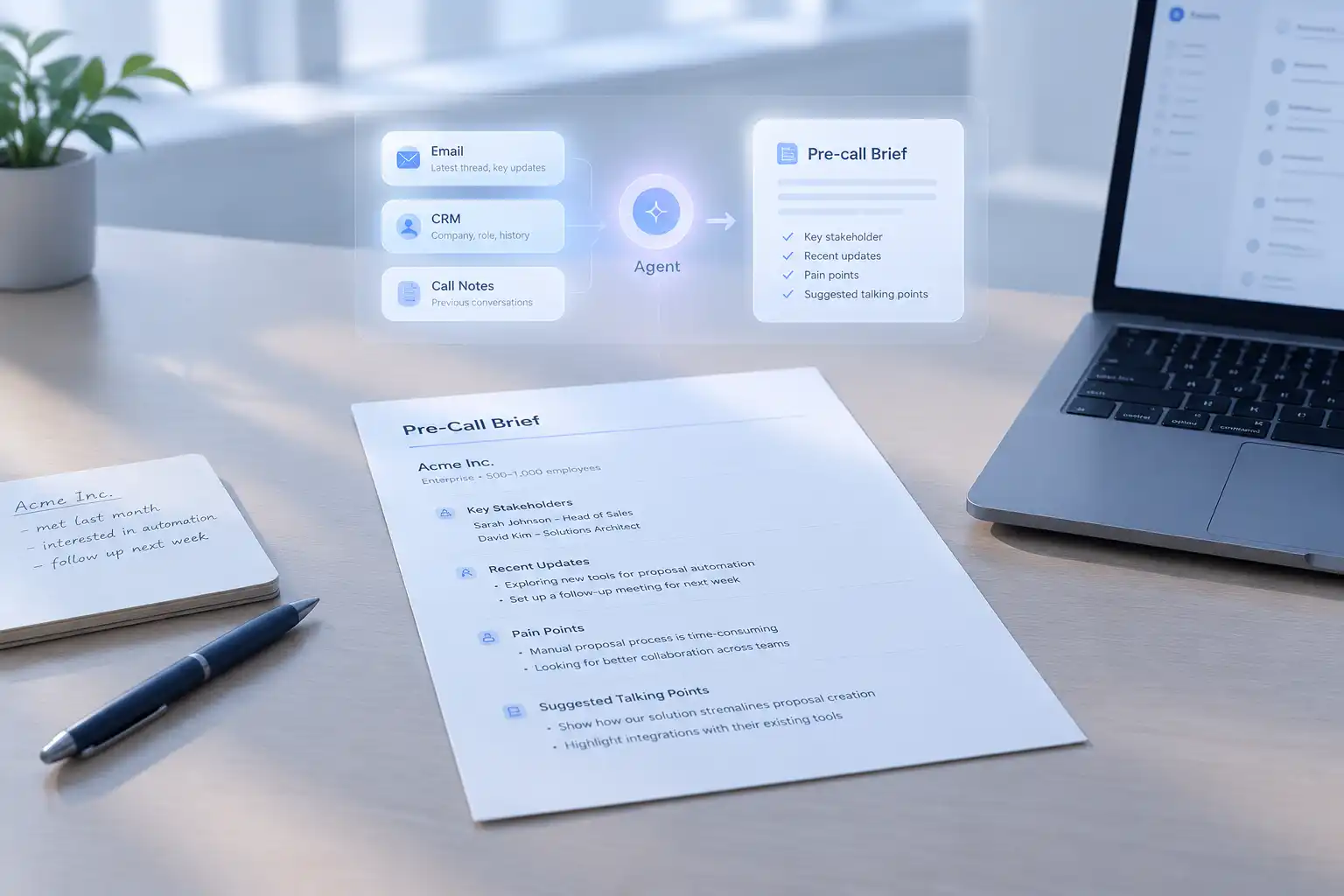
Skill: Pre-call brief (discovery)
Inputs: account name, meeting date, attendees, objective.
Steps: gather email and call notes; summarize the business situation; map the problem to product areas; list constraints; draft three open questions; flag unverified claims.
Output: one page with snapshot, business problem, open questions, constraints, and agenda.
Not every instruction belongs in a Skill. "Never send external documents without my review" is a standing preference, not a process. A task that changes shape every time may not be worth saving; this test for workflows worth turning into a Skill helps separate the two.
Done when: a colleague can trigger the Skill with one sentence and get the same structure you would produce. If they still need your notes, the Skill is incomplete.
Step 6: Test the Agent With Real Tasks and Review Its Output
Test with work you have already done, so you have a known-good result to compare. Two or three cases are enough, but include an account with thin history and a case where sources disagree.
| Test case | What to check | Pass condition |
|---|---|---|
| Account with rich notes | Structure and facts | All sections present; every figure sourced |
| New account, little history | Handling gaps | Gaps marked unconfirmed; no invented detail |
| Conflicting CRM and email | Source priority | Both values shown; latest source identified |
Check each number against its source, each quote against the thread, and whether the questions are genuinely open.
Done when: the agent passes structure and facts on two real tasks. If facts fail, return to Step 3 or 4 rather than rewriting the prompt.
Step 7: Refine the Workflow Based on Errors and Feedback
The tempting fix is to edit the output and move on. That leaves the cause in place, and the error returns next time. Classify what went wrong and change the workflow instead.
| What went wrong | Likely cause | Change |
|---|---|---|
| Used an old close date | CRM was not checked | Add CRM to the source order |
| Brief ran to two pages | No length rule | Add the one-page limit |
| Invented a budget figure | No rule for missing facts | Add "mark unconfirmed" |
Some errors are one-off judgment calls, not permanent rules: if the situation was unusual, note it rather than encoding an exception.
Done when: the same error does not recur in the next two runs, and the correction lives in the Skill rather than one conversation.
Example: Training an AI Agent for Presales Work
Here is how the pieces fit together for a presales discovery call. The account is illustrative.
Inputs: the CRM record, 14 days of email, last call notes, and the approved solution deck.
Request:
Using the CRM record, the last 14 days of email, and the call notes in the project folder, prepare a one-page pre-call brief for Thursday's discovery call with Halden Logistics. Follow my pre-call brief Skill. Mark anything you cannot confirm.
Output skeleton:
- Account snapshot: industry, size, current systems, opportunity stage.
- Business problem: two or three sentences in the customer's words.
- Three open questions: each one the existing material cannot answer.
- Technical constraints: integrations, security review, timeline.
- Suggested agenda: five items, ordered by decision value.
- Unconfirmed items: facts to check before the call.
The engineer checks every figure against the CRM or email, confirms the quotes, and asks whether the questions would move the conversation forward. If the brief needed the same correction twice, the Skill is updated rather than the document alone. The value is not a perfect first draft; it is that the twentieth brief starts from the same method.
Common Mistakes to Avoid
Briefing the agent as if it shares your context. You know which deal is stalled. The agent does not unless you say so. Write down the implicit parts, especially the reason for the task.
Supplying context without hierarchy. Ten documents with no priority produce confident guesses. Name the authoritative source for each fact and the conflict rule.
Defining the output with adjectives. "Professional," "concise," and "client-ready" are not checkable. Specify sections, length, sources, and exclusions.
Testing on a clean demo task. Real accounts have missing notes and contradictory data. Test what will actually occur.
Adopting a good-looking output without verification. A well-formatted brief can still contain a wrong date or an invented figure.
How Noumi Supports Workflow-Based Agent Training
Noumi is an AI workspace for business and solution professionals. Its Agent Training page brings these pieces into one place: connected tools, saved Skills, standing rules and facts, and plugin bundles that group capabilities for a job.
Connectors, MCP, and CLI give the agent access to the systems where work already lives. After you connect and authorize a tool, the agent can read customer email in Gmail, open proposal files in Google Drive, or update task status and follow-up records in a CRM.
Skills hold the repeatable part of a workflow. You can install a ready-made Skill from the Capability Library, such as meeting minutes or customer research, upload your own, or ask the agent during a conversation to turn a method you just used into a Skill. Steps, standards, and tool usage carry into the next task; you can review and adjust them in Manage Skills.
Learning Items hold standing rules and facts: how you want work done, what your role covers, and project details. The agent can surface candidates during collaboration, and you confirm them in Learning, where you can adjust the project, trigger, and whether an item is a must-follow rule or advice. You can also add one with Write one myself.
Plugins group Skills, MCP servers, and Connectors used together, so a setup can be enabled per project or across the workspace. Capability Library provides ready-made Connectors, Skills, and Plugins for presales, solutions, and business analysis.
In practice, task definitions and rules become instructions and Learning Items, the source order becomes Connectors, and the stable method becomes a Skill. For reusable standards, see Signature-Level Fluency; for role context, the Solutions Engineer use case.
Start With One Workflow
Pick one task you can describe, test, and correct within a week. Define the output, write the steps, add rules and sources, save the method, then fix causes rather than symptoms. The first workflow does not need to be the most valuable one; it needs to be one you can judge.
Once it holds, add the next task. The broader practices for training AI agents on company-specific processes become easier when you have one working example. If you are comparing tools, the AI agent training tools comparison uses similar criteria. To build the workflow in a shared workspace, explore Noumi.